​It's time to celebrate 35 years of Aerosoft! Get up to 35% off in our big ANNIVERSARY SALE!

Desktop Pilot - Multi Instrument Panel

MSFS | XP

Spedizione articoli
543,35 € *

Prezzi incl. 22% IVA più spese di spedizione

Pronto per la spedizione di oggi,
tempo di consegna ca. 1-3 giorni **

Bring essential flight data to life with the Desktop Pilot - Multi Instrument Panel , a... altro
Informazione prodotto "Desktop Pilot - Multi Instrument Panel"

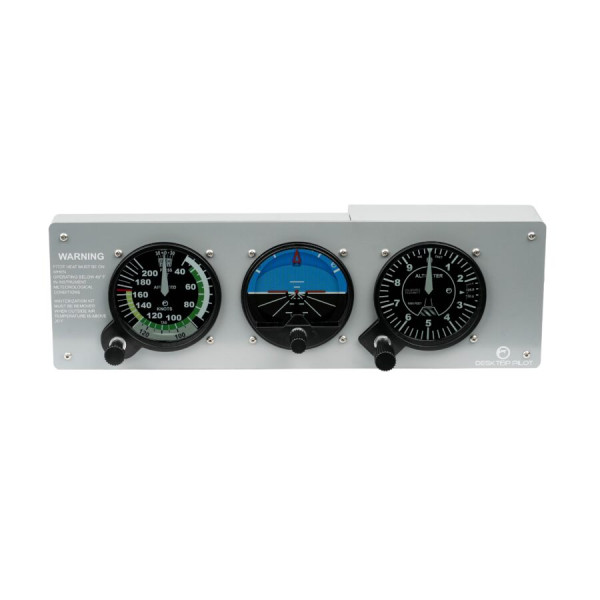
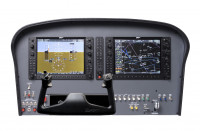
Bring essential flight data to life with the Desktop Pilot - Multi Instrument Panel, a high-fidelity replica of the Cessna 172 Skyhawk instrument cluster. Featuring analog-style Airspeed, Attitude, and Altimeter gauges with interactive rotary encoders, this panel delivers real-time simulator feedback and hands-on realism. Switch between graphical and digital display modes, adjust brightness, and enjoy seamless integration with X-Plane 11/12 and MSFS 2020/2024 on Windows PCs. Ideal for enhancing both desktop setups and full-scale sim cockpits. Whether you’re a hobbyist or a serious aviator, it’s the perfect addition to your setup.

The Multi Instrument Panel from Desktop Pilot is the ultimate upgrade for flight sim enthusiasts seeking a realistic, interactive cockpit experience. This high-quality instrument panel brings essential flight data to life with stunning clarity, offering everything you need for a true-to-life virtual flying experience.

Skyhawk-Inspired Instrumentation
Accurately modeled after the Cessna 172 Skyhawk, the panel recreates its essential gauges and flight data presentation using custom graphics via SkyView software.

Included Analog Instruments

  • Airspeed Indicator – Displays indicated and true airspeed (KTAS) in knots
  • Attitude Indicator – Shows pitch and roll, aiding in aircraft orientation
  • Altimeter – Indicates current altitude with adjustable barometric settings

Rotary Encoders & Interactive Controls

  • KTAS Encoder – Adjusts Knots True Airspeed dynamically based on conditions
  • Flight Director Encoder – Aligns the indicator “hoop” within the Attitude Indicator for precision path tracking
  • Barometric Pressure Encoder – Adjusts the altimeter to current atmospheric pressure

Additional Functionalities

  • Press Airspeed Encoder → Battery Reset (X-Plane Exclusive)
  • Press Altimeter Encoder → Resets pressure to standard 29.92 inHg
  • Press Attitude Encoder → Toggle between Graphical Mode and Textual Mode

Adjustable Instrument Brightness
Using the STBY IND potentiometer on the optional Desktop Pilot Switch Panel (sold separately), you can easily fine-tune the brightness of analog instruments – ensuring perfect visibility in all lighting conditions.

Two Display Modes

  • Graphical Mode (Default) – Displays traditional analog-style instruments
  • Textual Mode – Shows flight data as digital numerical readouts for increased readability or accessibility

EASY SETUP & INSTALLATION

  • Mount the Panel
    Secure the Multi Instrument Panel to your desktop or seamlessly integrate it into your   cockpit using the included mounting hardware.
  • Connect via USB
    Plug the panel directly into a USB port on your Windows-based PC or an external USB hub
  • Install Software
    Download and install the included SkyView and SkySync software from Desktop Pilot.
  • Launch your simulator
    Start X-Plane or Microsoft Flight Simulator – the panel automatically syncs and is ready to fly.

COMPATIBILITY
The Multi Instrument Panel is designed for seamless integration with a wide range of popular flight simulation platforms when connected to a Windows-based PC. Supported software includes:

  • X-Plane 11 & 12
  • Microsoft Flight Simulator 2020 & 2024

The panel operates using Desktop Pilot’s SkyView and SkySync software, both of which are included with your purchase.

Link correlati a "Desktop Pilot - Multi Instrument Panel"

FABRICANTE
Desktop Pilot Inc.
1639 Bradley Park Dr Ste 500, Columbus, GA 31904, USA
support@desktoppilot.com


PERSONA RESPONSABILE UE
Aerosoft GmbH
Lindberghring 12, 33142 Büren, Germany
info@aerosoft.com

-30
NUOVO
Aerosoft Airport Venice Aerosoft Airport Venice
  12,88 € * 18,40 € *
NUOVO
NUOVO
-35
FSDG - Flight Suite Pro FSDG - Flight Suite Pro
  6,66 € * 10,24 € *
NUOVO
-30
Just Flight - C152 XP12 Just Flight - C152 XP12
  26,30 € * 37,57 € *
-30
Just Flight - PA-28-161 Warrior II XP12 Just Flight - PA-28-161 Warrior II XP12
  26,30 € * 37,57 € *
-30
-25
Aerosoft Truck & Bus Wheel System Aerosoft Truck & Bus Wheel System
  307,56 € * 410,08 € *
-30
DC Designs F-15 C, E & I Eagle MSFS DC Designs F-15 C, E & I Eagle MSFS
  24,02 € * 34,31 € *
-35
Truck & Logistics Simulator Truck & Logistics Simulator
  13,29 € * 20,45 € *