Wir heben ab und feiern 35 Jahre Aerosoft! Sichere dir jetzt bis zu 35 % Rabatt bei unserem großen Jubiläums-Sale!

Skyline Simulations - KROA - Roanoke Regional Airport MSFS 2024

MSFS 2024
Download
21,41 € *

Preis inkl. 19% MwSt.

Als Sofortdownload verfügbar

  • AS17147
  • Skyline Simulations
  • 1.0.0
  • Aerosoft One
Experience Virginia’s Blue Ridge – The Aviator’s Choice! Roanoke-Blacksburg Regional Airport... mehr
Produktinformationen "Skyline Simulations - KROA - Roanoke Regional Airport MSFS 2024"

Experience Virginia’s Blue Ridge – The Aviator’s Choice!
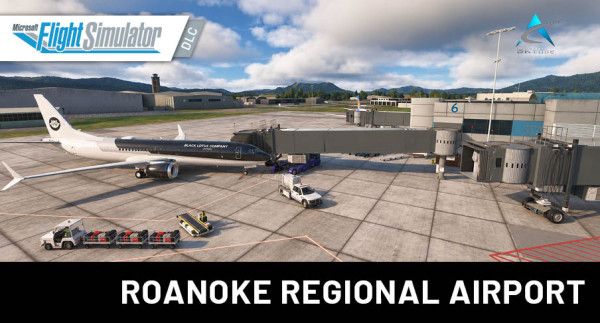
Roanoke-Blacksburg Regional Airport (KROA), also known as Woodrum Field, is one of Virginia’s most scenic regional airports, surrounded by the breathtaking Blue Ridge Mountains.

Located in Roanoke, Virginia, the airport serves as an important gateway to Southwest Virginia and the New River Valley, connecting passengers to major destinations across the United States. The airport is served by American Airlines, Delta Air Lines, United Airlines, and Allegiant Air, offering connections to destinations including Atlanta, Charlotte, Chicago, Dallas/Fort Worth, Philadelphia, Washington Dulles, and popular leisure destinations in Florida.

With its mountainous surroundings, challenging approaches, and distinctive airport layout, KROA delivers an exciting flying experience for both commercial aviation and general aviation enthusiasts.

Skyline Simulations brings Roanoke-Blacksburg Regional Airport to life in Microsoft Flight Simulator 2024, featuring highly detailed custom buildings, realistic ground environments, carefully crafted airport infrastructure, and immersive animations. Experience the beauty of Virginia’s Blue Ridge with an airport designed to deliver realism, atmosphere, and exceptional visual quality.

AIRPORT INFORMATION

  • ICAO: KROA
  • IATA: ROA
  • Location: Roanoke, Virginia, USA
  • Airport Elevation: 1,175 ft (358 m)
  • Runway 06/24: 6,800 × 150 ft – Asphalt
  • Runway 16/34: 5,810 × 150 ft – Asphalt
  • Airport Type: Public
  • Services: Commercial Passenger – General Aviation
  • Airport Environment: Mountainous Terrain / Blue Ridge Mountains

FEATURES

  • Designed specifically for Microsoft Flight Simulator 2024
  • Highly detailed custom airport terminal and surrounding buildings
  • Detailed terminal interiors with custom 3D modeling
  • High-quality PBR materials and realistic surface textures
  • Custom ground textures with detailed markings, weathering, and decals
  • Realistic airport apron, parking stands, and taxiway layouts
  • Numerous custom 3D airport objects and ground equipment
  • Animated automatic terminal doors
  • Detailed baggage handling areas and airport infrastructure
  • Custom airport signage and terminal details
  • Realistic glass, metal, concrete, and other architectural materials
  • Detailed airport surroundings and hangar areas
  • Ground service infrastructure and vehicle paths
  • Carefully optimized 3D models with multiple Levels of Detail (LODs)
  • Immersive airport environment designed for regional airline and general aviation operations

Discover Roanoke Like Never Before
From the beautifully modeled airport terminal to the detailed apron environments and dramatic mountain scenery, KROA Roanoke-Blacksburg Regional Airport by Skyline Simulations offers a richly detailed destination for flight simulation enthusiasts.

Whether you’re operating regional airline services, flying general aviation aircraft, or exploring the scenic landscapes of Virginia, KROA provides an engaging and immersive airport experience. Take your next flight into the heart of Virginia’s Blue Ridge.

Weiterführende Links zu "Skyline Simulations - KROA - Roanoke Regional Airport MSFS 2024"
  • Microsoft Flight Simulator 2024
  • Betriebssystem: Windows 10 / 11 (64-bit)
  • CPU: AMD Ryzen 5 2600X oder Intel Core i7-6800K (empfohlen: AMD Ryzen 7 2700X or Intel Core i7-10700K)
  • Arbeitsspeicher: 16 GB (empfohlen: 32 GB RAM)
  • Grafik: NVIDIA GeForce GTX 970 oder AMD Radeon RX 5700 (empfohlen: NVIDIA GeForce RTX 2080 or AMD Radeon RX 5700 XT)
  • Grafikeinstellungen: Medium (empfohlen: hoch)
  • SSD-Speicher empfohlen
  • Stabile Internetverbindung
  • Die Leistung kann je nach Flugzeug, Verkehrsdichte, Grafikeinstellungen, Systemkonfiguration und anderen installierten Add-ons variieren.

Die Installation erfolgt über Aerosoft One, dazu ist eine Internetverbindung und ein Benutzerkonto bei Aerosoft erforderlich!

Weitere Informationen zu Aerosoft One können Sie aus dem User Guide entnehmen oder unter den FAQs finden.

Wenn Sie bereits die MSFS 2020 Version des Roanoke Regional Airports im Aerosoft Shop erworben haben, steht Ihnen folgende Upgrade-Möglichkeit zur Verfügung:

  • KROA - MSFS 2020 ›  KROA - MSFS 2024:
    11,89 € inkl. 19% MwSt. (9,99 € ohne MwSt. | Preisangabe ggf. aufgrund der landesspezifischen MwSt. des Herkunftslandes abweichend)

Legen Sie das Produkt einfach in den Warenkorb und der Rabatt wird automatisch abgezogen. Dafür müssen Sie in Ihrem Kundenkonto angemeldet sein, mit dem Sie die MSFS 2020 Version erworben haben!