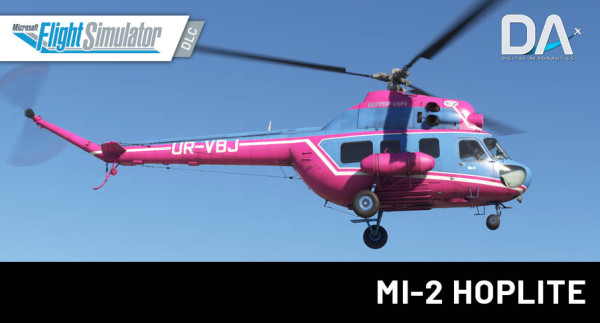
The prototype of the real Mi-2 helicopter is an outstanding example of Soviet design. Produced in Poland in a variety of modifications, it found popularity in many countries due to its multifunctionality and unique style. This meticulously built study-level model is the result of countless hours of research and development by multi-talented team of professionals.
Compatibility Notice:
This product is designed for MSFS 2020 but is NOT compatible with MSFS 2024, due to multiple custom features. An official version tailored specifically for MSFS 2024 will be released after the completion of its development. The MSFS 2024 version will include new features exclusive to the 2024 release.
PRODUCT FEATURES
- Unprecedented visual similarity with real model based on photo-scanning and photogrammetry technologies and thousands of pictures taken from various airfields. Authentic interior and exterior full detailing and high-resolution textures.
- A fully clickable cockpit with authentic avionics and systems replication providing realistic flight procedures and system simulations that give you an unforgettable study-level experience.
- Comprehensive user manual based on the official documentation, including detailed descriptions of flight procedures and real-life checklists.
- An authentic Flight Model (FM) implemented in strict accordance with Flight Manual specifications and real-life Mi-2 pilots feedback.
- ealistic animations and visual effects, including signal rockets and aerobatic smoke.
- Immersive illumination and night lighting.
- Authentic sounds recorded exclusively from a real Mi-2 helicopter board capturing the full range of audio effects, including distance effects based on the user’s position.
- Full VR compatability with exclusive ability to use only VR controllers to make the flight even more immersive.
- Solid performance on any hardware type maintaining a FPS comparable to default aircraft at standard airport, often exceeding 60 frames per second.
- Future model upgrade within the framework of MSFS-2020 version and diligent customer support.
CUSTOM FEATURES THAT REPEAT THE ACTUAL BEHAVIOR OF A REAL-LIFE HELICOPTER
1) Helicopter systems
- Electrical system that accounts for all loads of DC and AC consumers, current, resistance and voltage; load on the batteries, their discharge and charging; realistic behavior of generators when distributing load between them; realistic behavior of converters and their consumers;
- Pneumatic system maintains a constant air pressure in the brake system using a compressor installed on the engine, has an air flow rate and is necessary for the operation of the helicopter brake system;
- Fuel system accounts for fuel consumption at different engine modes; fuel quantity indicator accounts for the position of the helicopter in space (roll, pitch) repeating the position of fuel in the tank;
- Hydraulic system accounts for pressure, temperature, the amount of hydraulic fluid depending on loads and the state of the atmosphere;
- Oil system accounts for pressure, temperature, the amount of oil, depending on the operating modes of the engines and the state of the atmosphere;
- Fire extinguishing system, including system monitoring and control.
2) Engines control
- Implementation of motor control, including separate control;
- Engine starting system accounts for the load on the electrical system at the time of starting, the state of the atmosphere and the state of the liquids required for the operation of the engines;
- Kinematics of combined control unit of engines RPM and propeller pitch that allows to perform all checks, including engines run-up in accordance with the manual.
3) Helicopter control
- The interaction of the helicopter control knobs fully corresponds to the actual position of the blade angle in different flight modes;
- Trimming system allows you to balance the helicopter in a stable position.
4) Navigation
- ADF allows you to navigate by beacons and indicates the magnetic course of the helicopter; this system also implements a simulation of the gyro-magnetic compass operation with a simulation of real slaving.
5) Radio
- Radio unit allows radio communication with ATC at the selected frequency;
- Intercom allows to select various listening modes, including ADF signals.
6) Instruments
- Aviation clock with second meter repeats the actual behavior of the watch, including all operating modes of the watch;
- Gyrohorizons have realistic behavior of gyromechanism, including its spin-up and shutdown;
- Anaeroid tubes allows realistic behavior of instruments that use them, including the influence of incoming flow and atmospheric pressure;
- Devices operating from electric current account for inertia and friction force of needle indicators;
- Radio altimeter accounts for slaving and adjustment.
7) Lighting equipment
- Depends on the state of the helicopter electrical system.
8) Heating and anti-icing systems
- Allow to monitor the condition of the icing of the helicopter and control the heating of the blades and windows of the helicopter depending on the state of the environment.
9) Atmospheric precipitation (rain)
- Realistically displayed on the surface of the windows of the helicopter along with the effect of icing on windows.
10) Firing signal rockets and smoke generator
11) Flight Model
- Accounts for realistic location of the center of gravity, as well as its influence on the control of the helicopter.
12) Interacting with the cockpit and helicopter controls
- The mechanical and kinematic behavior of these controls was taken into account (right up to simulating the operation of the toggle switch spring).
13) Switching from asymmetric to straight airflow and vice versa
- Causes natural vibration.
14) Natural deflection of the blades
- Reaction to the wind in an idle state and the cone of rotating blades changes its size depending on the load on the main rotor.
NTERACTIVE COCKPIT FEATURES AND OPTIONS
- VHF allows you to adjust ATC frequencies in multiples of 0.25.
- Manipulators: combine two modes of interaction.
- mouse wheel - instantaneous state switching;
- left mouse button + movement - realistic state switching.
- VR - fully adapted, including control of the longitudinal and transverse control knob by moving the controller.
- The model includes the ability to automatically start and turn off the helicopter with the preparation of systems in the correct sequence through simulator commands.
- To facilitate control, some controls are connected to simulator commands (see manual list).
- When controlling the watch, it is necessary to familiarize yourself with the instructions, since due to the complexity of the implementation, combined control of the manipulators was used.
- Due to the realistic implementation of the electrical system and the load on the batteries at the time of starting, the battery charge is enough for 5-6 unsuccessful starts. Due to the fact that it is not possible to replace the battery, the model must be restarted to reset the state of the batteries.
- The altimeter has realistic control of the pressure setting handle, which has a reverse direction of rotation (rotation to the right reduces the barometric height, while rotation to the left increases it).
- To remove the helicopter from the parking brake, press the latch on the helicopter control stick or use the simulator command.
- 10. The nose steering wheel is made in accordance with a realistic model, and is free castoring (not directly related to the position of the pedals).
- Due to the realism of helicopter centering, restrictions on helicopter centering and loading should be complied with.
- For correct display of the helicopter heading on the UGR-4UK device in 3.5 min after starting the helicopter and starting all systems, it is necessary to slave the heading system by pressing the «СОГЛАСОВАНО» button.
- For toggle switches with more than 3 positions, to move the toggle switch in the required direction, use manipulator located in the direction of toggle switch movement (wiper toggle switch, АКК/ГЕНЕРАТОР toggle switch).
- Due to the custom implementation of all systems, we do not recommend using default simulator failures.
AUDIO AND IMMERSION
- Wwise fully dynamic sound pack;
- Sound of engines, systems and other controls
- Microsoft Flight Simulator 2020
- Windows 10 / 11
- Intel Core i5-10400F or Ryzen 5 3600 or better
- NVIDIA GeForce GTX 1660 Super or Radeon RX 6600 or better (6 GB minimum)
- 32 GB of system memory (16 GB minimum)
- Disk Space: 10.7 GB (extracted)
Installation runs via Aerosoft One, this requires an internet connection and an Aerosoft user account!
More information about Aerosoft One can be found in the User Guide or in the FAQs.
VERSION 1.1.0
Systems
- Fuel system. Corrected fuel transfer between tanks
- Hydraulic system. Operational pressure corrected
- Anti-icing system. Heating cycle and load behavior implemented
- Electrical system. Corrected power supply from converters and indicator lights
Instruments
- Added TNV-45 thermometer
- UGR-4UK course indicator. Initial course alignment, synchronization process, and ADF needle behavior updated. Added bolt into the vernier slot, corrected material of the vernier, added scale to the COURSE RP pointer
- US-250 airspeed indicator. Response to wind, airflow and direction effects implemented;
- USHV rotor pitch indicator. Realistic behavior during power loss
- KI-13K compass. Recalibrated, corrected scale and rotation direction, added decals, added heading index
- Pressure gauges. Corrected needle response to electrical power input
- Fuel gauge KES2097. Corrected behavior for more realistic fuel transfer indication between tanks
- RV-3. Added decals on the instrument frame
Powerplant
- Rotor RPM governor and engine response to controls made smoother and more realistic
- Exhaust gas temperature. Corrected start-up spike and gradual cooling after shutdown
- Oil pressure. Aligned with operational regimes
- Engine shutdown behavior made more realistic
- Fuel consumption refined according to documentation
- Corrected engine power curve across full altitude range (0–5000 m) according to GTD-350 performance tables:
- 0–750 m: slight power increase
- Above 750 m: linear power decrease
- Ambient temperature effect on engine power is controlled by simulator logic
- GTD-350 power curve is nonlinear; at +25°C and above, simulator may produce excess engine power • Added engine spool delay behavior:
- Raising collective too quickly can prevent engines from immediately reaching the necessary power, leading to a temporary drop in rotor RPM
- According to documentation, collective should be increased to takeoff power within 6–8 seconds
Rotor RPM corrections across all regimes
- Single engine at idle: rotor RPM = 40%
- Two engines at idle: rotor RPM = 50%
- More realistic rotor spool-up during engine start
- Smoother rotor deceleration during shutdown
- High power mode (right correction): rotor RPM maintained around 81%
- Adjusted rotor spool timing to operational regimes
- Adjusted rotor spool-down timing to idle regime
- Collective / engine RPM / rotor RPM relationship aligned with documentation across all flight phases • Collective 0–8: rotor RPM maintained at 81%
- Collective 9: rotor RPM 80%
- Collective 10: rotor RPM 79%
- Collective 11+: rotor RPM 78% and lower
Flight Model
- Improved ground effect modeling (hover performance near ground partially corrected)
- Rotor blade lift characteristics adjusted. Reference condition used for tuning:
- Takeoff mass: 3200 kg
- Outside air temperature: +18°C
- Pressure: 740 mmHg (H760 = 250 m)
- Hover height: 15 m
- Engine power: 93%
- Rotor pitch: 7.5°
- Rotor blade performance generally matches documentation in cruise modes, but some issues remain. With increasing airspeed, rotor unloading is insufficient, resulting in higher required engine power
- Autorotation.Simulator does not model freewheel clutch behavior, resulting in excessive rotor RPM decay after engine shutdown in flight. Other blade characteristics during autorotation are generally within expected behavior
- Increased aircraft responsiveness to control inputs:
- Reduced instability in hover
- Improved stability with increasing airspeed
- Faster response in roll and pitch inputs
Interior
- Added labels to the fuse box cover and flare launcher panels
- Added missing bolts and rivets
- Added latch striker plates on the frame of the front right door
- Added textures to the wiring of ceiling lights
- Added bolts into the openings of lighting regulators
- Corrected shading on lighting regulators and anti-icing system controls
- Added sealing rubber for the front left door
- Added additional animations (levers, valves)
- Other minor fixes and improvements
- Added safety strap handles
Exterior
- Corrected position of the right fuel tank
- Animated right and rear left doors
- 3D and animation fixes for the front left door
- Improved tail rotor textures
- Other minor fixes and improvements
- Added rear left door latch
- Added sealing rubber for the front left door and added missing bolts and rivets
Doors
- Cabin doors fully implemented with individual mechanics for each door
- Interactive opening by dragging the handle with inertia response
- Doors react to helicopter flight dynamics (pitch, acceleration/deceleration, roll, yaw)
- Doors may partially open or close in flight if not properly secured
Animations
- New animated cockpit elements: door handles, buttons, latches, locking mechanisms
- Stops, locking levers and additional cockpit mechanisms added
- Additional missing animations added for cockpit, exterior and interior elements
- Reduced rotor coning angle
- Rotor brake lever now sets correct position depending on aircraft loading state in simulator
Controls & Performance
- Switches now respond to mouse wheel input
- Major code optimization and performance improvements
Protection
- Product protection system against unauthorized use (DRM)