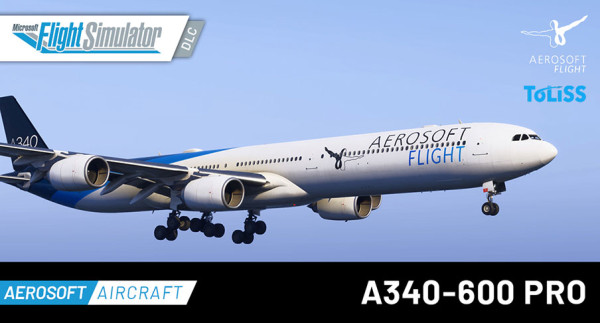
Aerosoft Aircraft A340-600 Pro






Prezzi incl. 22% IVA
Disponibile come download immediato
- Numero Ordine: AS16881
- Publisher: Aerosoft
- Sviluppatore: Aerosoft, ToLiss
- Versione corrente: 1.0.5
- Installation via:

The most advanced Airbus systems on the market – now finally available in MSFS!
The Aerosoft A340-600 Pro, developed in cooperation with ToLiss, faithfully recreates one of the most iconic long-haul aircraft with exceptional attention to detail, advanced systems simulation and immersive flight dynamics. Designed for serious flight simulation enthusiasts, this long-range flagship delivers an authentic experience from the cockpit to the cabin.
All aircraft systems and flight/engine models developed by ToLiss.
A340-600Pro Features
Aircraft handling
- Custom flight model created specifically for this project allowing to accurately represent the aircraft flight physics. This allows better representation of the following effects than the MSFS default flight model:
- Effects of each individual control surface (2 aileron pairs that move individually, 6 independent spoiler surfaces)
- Accurate Lift/Drag modelling
- Effects of control surface failures (e.g. jam or free floating) on both aircraft dynamics and drag computations
- Custom coded aircraft flight control laws representing Normal law, Alternate 1, Alternate 2 and Direct Law, each providing different aircraft handling and protections as in real life.
Aircraft systems – general
- Detailed model of the aircraft hydro-mechanical and electrical systems, including system interdependencies
- 303 different system failures that can be ejected via our fault injection screen. Failures can trigger manually at a given time, altitude or speed as well as in a random fashion in a specific flight phase.
- Functional reset switches. All in cockpit reset switches are functional and can be used to reset the appropriate fault types.
- Hoppie CPDLC is supported, including PDC and WX data download via the Hoppie network
- ACARS functions: Simbrief flight plan import directly into the FMGS, including TO performance computations via MCDU uplink request
- Aircraft displays: Detailed custom display system with accurate representation of the different displays and ECAM pages as well as display reconfiguration in case of failures
Aircraft systems – FMGS suite
- Three fully functional, fully independent MCDUs.
- Two completely independent Autopilots. AP1 controls the aircraft based on the data displayed on the captain PFD, AP2 control the aircraft based on the data displayed on the copilot PFD. Due to our detailed ADIRU model (see below), these are not exactly the same – same as in real life.
- Flight Management system features:
- Support for all A424 legs
- Airbus specific vertical navigation capability, including step climbs
- Active, Alternate and two level of temporary flight plans
- Route offset from current position
- Support for pilot defined holdings, computed holdings and database holding.
- Support for pilot items such as custom waypoints, custom navaids, custom runways via the MCDU Data B page. Real life limitations for the number of elements apply.
Aircraft systems – specific
- Detailed ADIRU model: Custom modelling of the 3 Air Data and Inertial reference Units (ADIRUs) including injection of measurement accuracy errors on pressure readings and attitude angles. This simulates small differences between pilot and copilot side as they occur in real life also due to sensor accuracy limitations. The output of this model feeds the FBW system and the autopilot system. Therefore, both systems respond to modelled errors in the ADIRUs.
- Custom engine model: The aircraft uses a fully custom engine model for the computation of all engine parameters such as N1, N2, N3, EGT, fuel flow, thrust etc. This allows achieving a high level of accuracy for the simulated engine thrust and therefore the aircraft performance.
- Bleed system model: The amount of bleed air consumed by Air conditioning packs, engine starters, anti-ice etc. feeds back into the engine model and affects fuel flow, EGT as well as maximum available thrust. The underlying model computes pressure losses throughout the bleed ducts and valves in order to correctly distribute the bleed air usage between the engines.
- Electrical system model: Electrical system with all real-life bus reconfigurations and load propagation between busses including emergency generator, battery only supply etc.
- Hydraulic system model: A detailed hydraulic system model computes the hydraulic flow through the control surface actuators, landing gear pistons, brake accumulators etc. in order to appropriately load the hydraulic pumps. If the flow exceeds the pumps capacity, e.g. because you are flying on the Ram Air Turbine at low speed, the pressure in the system will drop, affecting the motion of all consumers of that system.
- Flight control surface model: The flight control surface move in response to a detailed actuator model that simulates the electro-hydraulic control loop of real-life actuators, including motion of the Electro-Hydraulic Servo Valves, Mode Select Valves etc. This leads to a realistic simulation of the ability of the surface to deflect against the aerodynamic forces. In case of hydraulic or actuator failures, the surface will have limited ability to deflect and in case that all actuators are lost it will float in the “aerodynamic neutral” position, i.e. the position into which the airflow pushes the surface.
- Fuel system model: Complete model of the A340-600 fuel system with 8 different fuel tanks, engine cross feed, mid and aft fuel transfer systems, jettison, in cruise CG control etc.
- Brake temperature model: Brake temperature model considering heat transfer between brake pads and discs, temperature sensors and wheels giving the appropriate delays in temperature sensing
- Radio navigation: Custom radio navigation model with simulated LOC and GS antenna locations, custom satellite visibility model, automatic, manual and backup tuning
- Taxi camera based on the MSFS Map API to assist during turns while taxiing.
Useability
- Detailed EFB with two subsets of functions. Functions available via the tabs in the top row are functions that you can find in a similar fashion in real life EFBs. Functions available via the tabs in the bottom row are simulator-specific functions that are not available in a real aircraft. Functions similar to those in a real aircraft EFB are:
- Navigraph Map and charts integration
- Simbrief OFP display. This can display an OFP downloaded directly into the EFB as well as OFPs downloaded via the MCDU into both the active and the secondary flight plan
- Weight and Balance screen showing also the predicted evolution of the CG and weight throughout the flight in order to ensure that you meet the landing weight and balance limits
- Take-off and landing performance calculators
- Interactive checklist
- Situation saving and reinstating: Ability to save an aircraft state exactly in order to continue from that state again another time. Note that WX reinstatement is subject to MSFS limitations
- Autosave: this saves the current aircraft state in regular intervals in order to allow resuming the flight, should MSFS crash
- Aircraft state changes: Ability to switch between 4 predefined aircraft states without affecting the flight plan in the FMGS. (Except if you switch to “cold and dark”, which will reset the FMGS.)
- Quick engine starts: Ability to perform an instant engine or APU start as well as an ADIRU quick align.
- Ability to force alternate or direct law independent of system failures.
- Support for a complete freeze when the simulator is paused or an active freeze that allows, e.g. to program the MCDU while the aircraft motion is frozen.
- Choice between two different weight variants of the aircraft (Standard and High Gross Weight)
- Choice between imperial or metric units on the aircraft screens and associated EFB pages
- Adjustable wing flex intensity to adapt it to personal preferences.
- Ability to skip straight to the next waypoint of a cruise segment in order to shorten the time in cruise.
Visuals
- Highly detailed and accurate 3D model of the Airbus A340-600 Pro, faithfully recreated based on real-world references and technical documentation.
- Custom-built animations for a wide range of aircraft systems and external components, delivering a dynamic and immersive experience.
- Realistic slats, flaps, and spoilers with smooth deployment and retraction sequences.
- Fully animated flight control surfaces including ailerons, elevators, stabilizer trim, and rudder, all responding precisely to pilot input and flight conditions.
- Advanced wing flex simulation dynamically influenced by aircraft weight, fuel distribution, ground unevenness, and atmospheric turbulence.
- Fully animated Ram Air Turbine (RAT) deployment in case of emergency scenarios.
- Detailed and animated passenger and cargo doors (bulk configuration to be determined), reflecting operational states.
- Functional cockpit door and animated cockpit windows, including locking mechanisms.
- Realistic landing gear animation including strut compression, extension/retraction cycles, and gear door sequencing.
- All animations are system-driven and react to the aircraft’s current state (hydraulic, electrical, and other systems), including the possibility of system-related damage effects.
- Fully custom-modeled 3D cockpit with high-resolution textures and precise geometry.
- Immersive cockpit lighting system with dynamic effects, interactive animations, and integrated sound design.
- Completely modeled passenger cabin interior, adding depth and realism to the oveall aircraft presentation.
Included situations
These 10 situations allow you to explore the aircraft's various levels of simulation. You can experience everything from an 'easy' approach to complicated system failures, where you, as the pilot, have to handle the situation correctly. Let's challenge yourself – it's awesome and great fun to experience what real pilots are trained for!
Included liveries
- Standard Livery | Aerosoft House | D-AERO (Fictional)
- Standard Livery | Azerbaijan Government | 4K-AI08 (Current)
- Standard Livery | Azman Air | 5N-AMM (Past)
- Standard Livery | Cathay Pacific | B-HQC (Past)
- Standard Livery | China Eastern Airlines | B-6051 (Past)
- Standard Livery | Conviasa | YV3545 (Current)
- Standard Livery | Etihad Airways | A6-EHI (Past)
- Standard Livery | Hainan Airlines | B-6510 (Past)
- Old Livery | Iberia | EC-JLE (Past)
- New Livery | Lufthansa | D-AIHI (Current)
- Old Livery | Lufthansa | D-AIHY (Current)
- Standard Livery | Mahan Air | EP-MMQ (Current)
- Standard Livery | Plus Ultra | EC-NFQ (Past)
- Standard Livery | Qatar Airways | A7-AGA (Past)
- Standard Livery | Sky Prime | HZ-SKY (Past)
- Standard Livery | South African Airways | ZS-SNA (Past)
- Standard Livery | Thai Airways | HS-TNA (Past)
- Standard Livery | Universal Sky Carrier (USC) | D-AUSZ (Current)
- Classic Livery | Virgin Atlantic Airways | G-VWIN (Past)
Note: The L3S DRM licensing system is used for this product. Further information can be found in our privacy policy. Can only be used with one Xbox gamertag.

- Microsoft Flight Simulator 2020 or 2024
- OS: Windows 10 / 11
- CPU: Intel i7-10700K | Ryzen 7 5700 or better
- GPU: NVIDIA RTX 2080 | Radeon RX 5700 or better
- DirectX: DirectX 12
- VRAM: 8 GB
- RAM: 32 GB
- HDD: 18 GB
- Not for commercial use. For any commercial use inquiries, please contact info@aerosoft.de.
Installation runs via Aerosoft One, this requires an internet connection and an Aerosoft user account!
More information about Aerosoft One can be found in the User Guide or in the FAQs.
VERSION 1.0.5
- Reduced aircraft loading time
- Fixed issues that could lead to MFSF freezes or CTDs
VERSION 1.0.4
- Added derated CLB and derated TO options
- Fixed a potential crash related to the DCDU
- Fixed an issue with the highlighting of the altitude frame when approaching/deviating from the target altitude
- Fixed cabin carpet specularity
- Fixed RAM turbine animation broken
- Fixed cabin carpet wrong PBR effect
- Fixed scratchy cabin windows
VERSION 1.0.3
- Migrated project to native FS24 modular simobject structure
- Added LODs
- Fixed Taxicam for SU5
- Added custom turbulence model. Intensity can be user adjusted in EFB
- Display refresh rate is now user selectable
- FPS improvement for ND route drawing
- Added Pinned Charts and Airport quick access in Navigraph EFB
- Added SimBrief import option to not populate INIT B
- Added support for SayIntentions CPDLC
- Fixed an issue leading to loss of MAN FLEX on engine failure during a Flex take-off
- Fixed the cause for possible freezes of the FCU buttons after replay
- Automatically clear the “F-PLN DATALINK IN PROG” message once the datalink is complete
- Removed the “Always use SimBrief winds” option, as this is now the only source for wind data
- Fixed an issue that could lead to certain mouse clicks in the EFB on the Navigraph page being ignored
- Reduced the number of messages rejected by the ACARS system
- Fixed an issue that caused a 30-second delay when downloading chart data for a new airport on the Navigraph EFB page
- Added a fifth line to the DCDU to match the real-life configuration
- Inhibited certain input events, such as terrain detection, while replay is active in order to continue after replay in the same state as before
- Added code for FSCopilot integration
VERSION 1.0.2
New Features
- Added pinned charts and airport quick access in the Navigraph EFB
- Added LVAR to inhibit rotary acceleration for hardware FCU interfacing
- Added SimBrief import option to not populate INIT B
- Added support for SayIntentions CPDLC
- Added a fifth line to the DCDU to match real-life configuration
- Added LVAR for external replay tools to freeze system modelling
Fixes & Improvements
- Fixed an issue leading to loss of MAN FLEX on engine failure during a FLEX takeoff
- Fixed the cause for possible freezes of the FCU buttons after replay
- Fixed an issue that could lead to certain mouse clicks in the Navigraph EFB page being ignored
- Fixed an issue that caused a delay when downloading chart data for a new airport in the Navigraph EFB
- Reduced the number of messages rejected by the ACARS system
- Automatic clearing of the "F-PLN DATALINK IN PROG" message once the datalink is complete
- Inhibited certain input events (e.g. terrain detection) during replay to preserve system state
- Removed the "Always use SimBrief winds" option (SimBrief is now the only wind data source)
VERSION 1.0.1
- Fixed missing packs sound with opened doors
- Added missing rain sounds
- Updated flap, cabin and ground roll sounds
- Some improvements to the waypoint skipping feature
- On go around, only the final is restrung into the flight plan
- Bug fixes to the pilot data functions, including the pilot route saving
- Made the in-flight wingflex less jittery
- Drag and fuel flow improvements at cruise altitude
- Fixed an issue that could lead to the inability to load new charts in the EFB
- Accelerated the situation load
- Added interfacing with the "rudder left" and "rudder right" axis.
- Fixed an issue which could cause the built-in pushback to behave erratically.
- Made door 2L the first door in the aircraft config in order to make MSFS prioritize this door for stairs/jetways etc.
- Fixed the direction of the Air Data and FMS selection switches
- Updated cockpit PBR effects