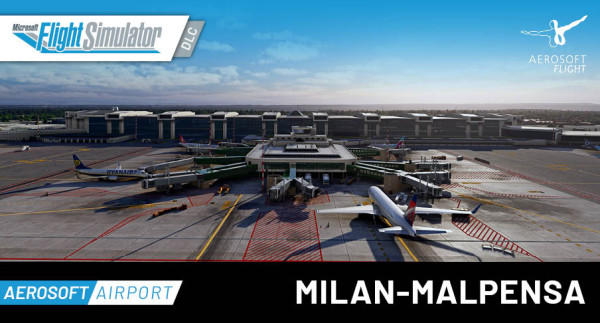
Der Milan Malpensa Airport ist Italiens zweitgrößter internationaler Flughafen, der im Jahr 2022 über 21 Millionen Passagiere abfertigte. Der 48 km nordwestlich des Mailänder Stadtzentrums gelegene Flughafen verfügt über drei Terminals und bietet Flüge zu über 180 Zielen in Europa, Asien, Nordamerika und Afrika. Der Flughafenkomplex umfasst umfangreiche Frachtanlagen, in denen jährlich rund 500.000 Tonnen Fracht abgefertigt werden, was ihn zu Italiens führendem Frachtflughafen macht.
Features:
- Präzise Nachbildung des Flughafens Mailand-Malpensa Airport (LIMC/MXP) mit aktuellem 2026 Layout (MSFS 2020: Layout aus 2024)
- Detaillierte Terminalgebäude mit sichtbaren Modellierungen im Innenraum (von der Luftseite aus)
- Hochwertige benutzerdefinierte Objekte, einschließlich Rollbahnbeschilderung und Beleuchtungskörper
- Realistische Lichteffekte in der Nacht mit dynamischer Beleuchtung
- Benutzerdefiniertes Luftbild des Flughafens und der Umgebung
- Kompatibel mit Aerosoft VDGS Modul mit Safedock T-1 Systemen
- Dynamische Umgebung mit individuellem Fahrzeugverkehr auf dem Vorfeld und Zugverkehr am Terminal
- Präzises Geländenetz und Landebahnprofile
- Unterstützung des KI-Verkehrs mit Airline-spezifischen Parkplatzzuweisungen
- Microsoft Flight Simulator 2020 oder 2024
- Betriebssystem: Windows 10 / 11
- Prozessor: Intel i5-4460 | AMD Ryzen 3 1200 oder besser
- Grafik: NVIDIA GTX 770 | AMD Radeon RX 570 oder besser
- DirectX: DirectX 11
- Videospeicher: 2 GB VRAM
- Arbeitsspeicher: 8 GB RAM
- Freier Festplattenspeicher: 6 GB
Die Installation erfolgt über Aerosoft One, dazu ist eine Internetverbindung und ein Benutzerkonto bei Aerosoft erforderlich!
Weitere Informationen zu Aerosoft One können Sie aus dem User Guide entnehmen oder unter den FAQs finden.
VERSION 1.6.0 | MSFS 2024 native:
Highlights
- AFCAD reworked to reflect January 2026 (terminals) and March 2026 (apron and cargo area) real-world layout using latest aerial data
- Official GSX profile with custom VDGS, pushback procedures, de-icing areas, and Python-scripted stop positions
- All default taxi signs replaced with custom hand-made signage
- Q-point markings added airport-wide for GSX aircraft release point support
- VDGS modules added to the cargo area
- All jetways at Extension-C now active
Airport Data
- Fix comm frequencies missing from the ATC menu
- Fix nav frequencies missing
AFCAD
- Rework terminals 1 and 2 area to reflect January 2026 status
- Rework cargo area to reflect March 2026 status using latest aerial data
Passenger Terminal
- Fix glossy grass texture
- Fix glossy roof texture
- Fix floating glass texture
- Fix LOD issues at terminal
- Fix window LOD color change and reflection artifacts
- Fix shadow/color tint squares visible from inside the terminal
- Add missing red lights on Terminal 1 roof
Cargo Terminal
- Fix misplaced gates in front of FedEx building (Stand 854)
- Fix misaligned luminance layer on FedEx and DHL buildings
- Fix letters on southern cargo building
Control Tower
- Fix missing interiors
Apron
- Add Q-point markings at the entire airport (compatible with GSX as aircraft release point)
- Add missing GSE around the airport
- Add VDGS modules in the cargo area
- Replace all default taxi signs with custom hand-made signage
- Rework night lighting – light poles repositioned to match real-life placement
- Fix Wigwag animation and misplaced Wigwag lights on taxiway D entering 35R/17L
- Fix ground markings around terminals 1 and 2
- Fix misplaced Stand 101
- Activate all jetways at Extension-C
Taxiway
- Fix low light density to match real-life conditions
- Fix incorrect CA2 taxiway marking
- Fix incorrect CF/CF2 markings
- Fix NO ENTRY markings at Charlie, Bravo, Delta, and Echo exits
Runway
- Fix threshold markings
- Adjust omnidirectional and bidirectional lights on both runways
- Fix transparency of runway numbers
- Fix hold short markings on 17L/35R
Ground & Surroundings
- Fix all terraforming issues around the entire airport
- Fix train tunnel
- Fix train placement (relocated to ground level)
- Fix train animation issues
GSX Integration
Official GSX profile by Luca Verzura, featuring:
- Custom VDGS placement and pushback procedures
- Realistic walk-in passenger paths
- Custom de-icing areas
- Python customization for accurate stop positions and gate grouping
Miscellaneous
- Add passengers inside Terminal 1 and in the public area of Terminal 2
- Add cars to the public parking area
- Fix de-icing equipment shelter
- Fix fire department buildings not casting shadows
VDGS Configuration
- Included XML configuration file for users of the Aerosoft VDGS Model for Microsoft Flight Simulator
VERSION 1.0.5 | MSFS 2024:
- Recompiled all models with the latest MSFS 2024 SDK
- LOD adjustments to critical models in order to verify compatibility with MSFS 2024 requirements
- Quality of Life improvements to the overall look of the airport
- Bug fixes and general improvements
Known issues:
- Due to a bug with MSFS 2024 SU3, approach lights system as well as PAPI model may appear/disappear randomly
- Due to MSFS 2024 lack of dual jetway support, some jetways are missing or define static to avoid misconfiguration
- Train animation is broken, will be fixed in the next update version
VERSION 1.0.2 | MSFS 2020:
- Terminal 2 modelling and texture enhancements
- Parking lots modelling and texture enhancements
- Added missing localizer antennas for all runways
- Train tunnel improvements
- General improvements and fixes
VERSION 1.0.1 | MSFS 2020:
Airport Infrastructure Changes
- Reworked AFCAD parking layout and adjusted parking radius
- Added airline codes to parking layout for improved AI traffic compatibility
- Added missing jetway bridges connecting Emirates lounge to gates 495 and 499
- Added missing beacon light on "Centrale termoelettrica di Turbigo"
- Removed blue edge taxiway lights to match real-world configuration
- Adjusted runway touchdown zone (TDZ) markings and lighting systems
- Added missing beacon light on the control tower, radar stations and terminal buildings
- Control tower modeling and texture adjustments to reflect real world status
- Added missing fuel farm at the north-east part of the airport
- Terminal 2 apron modeling and texture adjustments to reflect real world status
Visual and Asset Improvements
- Added missing ground vehicles around the airport vicinity
- Remove ground vehicles on specific locations to avoid conflict with the official GSX profile
- Taxi lines corrections on various places to avoid collision with static elements
- Implemented various minor model and texture fixes throughout the airport
System and Configuration Updates
- Added Configurator with option to toggle between Aerosoft VDGS and GSX VDGS
- Integrated official GSX profiles supporting both Aerosoft and GSX VDGS (Credits: JaxDaniels)